
Confirm the bot is working
After inviting Aegis, open the help menu first. This is the fastest way to make sure the bot is online, slash commands are loaded, and the setup can continue without guesswork.
/help
Setup guide
The easiest way to get value from Aegis is to set the foundation first: language, captcha, staff access, and ticket flow. Once those are in place, the rest of the moderation systems become much easier to run.
Recommended order
After inviting Aegis, open the help menu first. This is the fastest way to make sure the bot is online, slash commands are loaded, and the setup can continue without guesswork.
/help
Set the server language before configuring deeper systems. That keeps replies, embeds, and interactive setup flows easier to read for your team.
/language
Choose the category for temporary captcha channels, the arrival role for new members, and the verified role that replaces it after success.
/captcha setup
Staff roles let trusted moderators use Aegis tools without forcing you to grant full administrator to everyone. This is one of the cleanest ways to keep your permission model under control.
/staffroles add
Once language, captcha, and staff access are ready, build the ticket flow with your own topics, archive channel, support roles, and message presentation.
/support-ticket setup
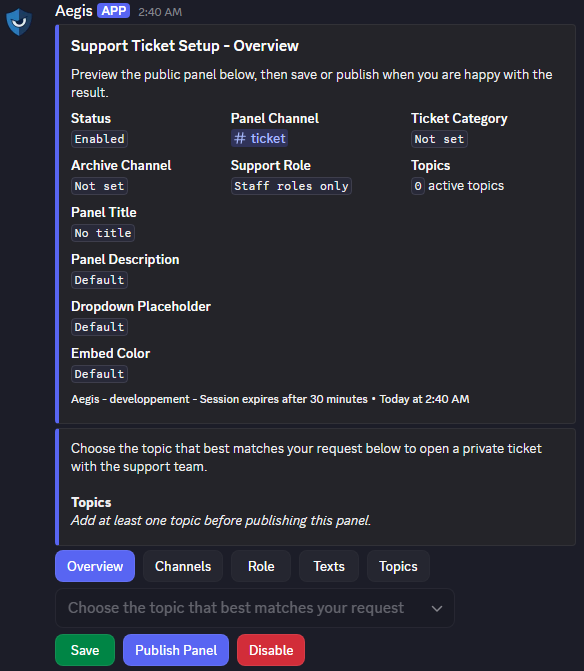
Ticket setup preview
The ticket setup is not just a plain command flow. Aegis gives you a real preview of the public panel before you publish it, so you can adjust the channel, support role, topics, text, and overall presentation with much more confidence.
That matters because server owners can immediately understand what the system feels like: guided, visual, and easy to review before it goes live for members.
Staff roles explained
Instead of using the broad Discord administrator permission for every moderator, you can define specific roles that Aegis recognizes as staff. That means the bot can let them access moderation and ticket systems while you keep the wider server permissions tighter.
Common first-day checklist
Need a hand?
If you are unsure about roles, captcha flow, or the ticket panel, the best route is to test the core commands and then ask with your current setup details.